
The hidden privacy risks inside every dental practice and how to fix them before they hurt
Dentistry runs on routine: regular cleanings, recall reminders, daily sterilization logs, and those little timers beeping away in the operatories. But there is one checkup that almost every practice forgets: a privacy checkup.
Unlike clinical risks, privacy risks do not cause immediate pain. They do not swell, bleed, or send off that unmistakable feeling that something needs attention. Privacy gaps sit quietly in the background until, often at the worst possible time, they turn into an incident, a patient complaint, a regulator call, or a very expensive lesson.
The good news is that these risks are easy to spot once you know where to look, and even easier to fix with the right guidance. Privacy Awareness Month is the perfect opportunity to take a fresh look at how your practice handles sensitive patient information and whether a few simple improvements could prevent trouble.
1. The accidental risks created by helping quickly
Every practice has someone who is endlessly helpful, the team member who wants to solve the patient’s problem immediately. They might send referral notes through whatever form or email seems fastest, grab a quick cloud app to store photos, or message a colleague through a platform that was not made for healthcare.
Their intentions are excellent. Their privacy impact is not.
Many popular apps store information outside of Canada, use weak or no encryption, or allow third party access that clinics do not realize is happening. A single upload or email sent the fast way can unintentionally expose personal health information.
How to fix it:
Create a software use policy and an approved list of privacy safe tools and make it easy for your team to choose the right one every time (Fig. 1).
Fig. 1: Privacy-Safe Tools Inventory
Use this table to keep track of the approved privacy-safe tools your practice uses. Update it regularly and review it during your annual privacy exam.
| Category | Tool Name | Purpose | Vendor | Data Location | Notes / Conditions |
2. Online forms that look professional but are not private
Patients love convenience, and dental clinics love efficiency. But not all online forms are created to adhere to privacy law and compliance. Some are beautifully designed but send patient data straight to email inboxes unencrypted. Others store information in generic cloud folders with unknown access controls.
What to ask from your vendor:
- Is the data encrypted in transit and at rest?
- Where is it stored?
- Who has access?
- How long is it kept?
- Can I get an audit trail?
3. AI tools sneaking in through the side door
AI is becoming common in dental practices. Staff use it to write emails, translate instructions, improve workflows, or summarize documents.
But AI tools are not private by default. If someone uploads a document containing patient details, the platform may store or reuse that data unless configured properly.
The fix:
Adopt an AI acceptable use policy. Teach your team what they can upload, what they cannot, and how to choose tools that respect privacy laws and security best practices for healthcare data.
What your AI use policy should cover
- Which AI tools are approved and which ones your team must avoid.
- What can’t be typed into AI, including any patient details or private office info.
- What’s safe to use AI for, like drafting emails, scripts, or education materials.
- How AI accounts must be set up, including privacy settings and MFA.
- Who is allowed to use AI and any training they need first.
- Human review required – nothing from AI should go out without someone checking it.
- What AI must never be used for, such as diagnosis or chart entries without oversight.
- How to report mistakes if someone uploads something they shouldn’t have.
- How files are saved or deleted, so nothing ends up in the wrong place.
- A reminder to review the policy regularly as tools and risks change.
4. Dark web surprises
Leaked email and password combinations from old breaches often circulate on the dark web. These are used as starting points for impersonation attempts, phishing emails, and login break-ins.
The fix:
Regularly check whether your clinic’s email addresses appear in known breach data. A privacy or security professional can do this by conducting a dark web scan. Use password managers, multifactor authentication, and a policy against password reuse (Fig. 2).
Fig. 2: Sample dark web scan report (Example data)
This is an example of what a dark web scan report might look like for a dental practice. All data below is fictional and for demonstration purposes only.
| Email Address | Breach Source | Date Exposed | Password Status | Risk Level | Recommended Action |
| admin@smyledental.ca | Dropbox | 2019-07-12 | Password Exposed | High | Reset password and enable MFA |
| reception@smyledental.ca | 2021-04-03 | Password Not Exposed | Medium | Monitor activity; ensure MFA enabled | |
| dr.jones@smyledental.ca | Adobe | 2017-10-22 | Password Exposed | High | Reset password; avoid reuse across systems |
| office@smyledental.ca | Canva | 2023-02-14 | Password Exposed | Medium | Reset password; update PW manager |
5. Vendors who do not realize they are part of your privacy team
From IT providers to billing services, every vendor who touches your data is part of your privacy chain. But not all vendors understand Canadian privacy laws or healthcare requirements.
Quick vendor check:
- Do they have training in privacy laws?
- Do they store data in Canada?
- Do they use third party processors?
- How do they handle data breaches?
- Do they delete data on request?
6. The human element
Most breaches happen because someone clicked on something they should not have or sent something without double checking. Dental teams are busy and multitasking, which increases the chance of mistakes.
But humans can become your strongest defense with simple, regular training and friendly reminders.
A simple privacy checklist
- Are we using only approved, secure apps for referrals and file sharing?
- Do we know where our online forms store patient information?
- Are we careful about what we upload into AI tools?
- Have we checked whether staff emails appear in breaches?
- Do we understand how our vendors protect patient data?
- Are staff confident identifying suspicious emails?
Get your privacy baseline
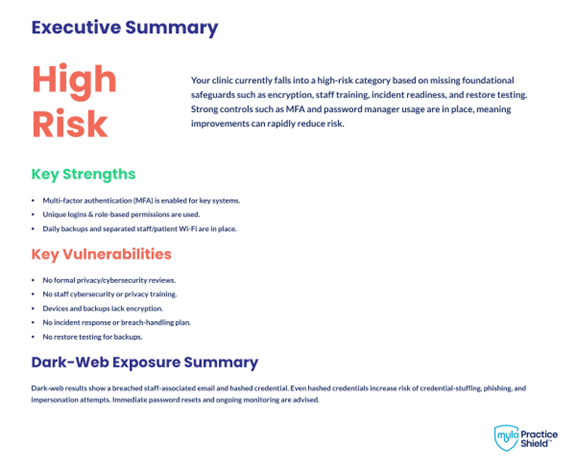
If you are not sure where your practice stands, a Dental Privacy and Cyber Risk Scorecard is a great first step. It is simple, quick, checkup and gives you a clear baseline of your gaps and recommendations to fix them (Fig. 3).
Fig. 3: Example page from Dental Privacy and Cyber Risk Scorecard
Protecting patient trust
Strengthening your privacy practices is part of great patient care. With small steps, you can protect your patients, support your team, and ensure your practice is resilient in an increasingly digital world.
About the author

Anne Genge, B.A.,CIPP/C, CHCSP, CHRAS, is the founder of Myla Training Corp, a company dedicated to helping dental teams work safely and confidently with digital information in the age of AI. She pioneered the Dental Privacy & Cyber Risk Scorecard as a fast, practical way for clinics to understand their baseline vulnerabilities and strengthen their data protection practices. Anne can be reached at anne@myla.training