
Abstract
The rise of artificial intelligence has made it easier than ever for cybercriminals to exploit stolen data. One overlooked risk is the Google Takeout archive, a downloadable file that contains the full contents of a Google account, including emails, contacts, calendars, photos, and even location history. For healthcare providers who use Gmail, this can mean exposing sensitive patient information, which raises serious compliance issues under Canadian privacy laws such as PHIPA, HIA, PIPA and PIPEDA.
This article highlights why a compromised Google profile is not just a personal problem but a professional one. With more than 1.8 billion Gmail accounts worldwide, attackers know the odds are in their favor. Once an account is breached, AI tools can sift through thousands of records in minutes, enabling targeted phishing campaigns, identity theft, and even extortion.
The good news is that a few simple habits offer powerful protection. Dental professionals should avoid logging into Google on public or shared devices, enable multi-factor authentication, and lock down or securely delete any Google Takeout files. These small but critical actions can protect not only individual practitioners but also their patients and practices from cascading breaches of trust.
The other night, I could not sleep.
Part of my job is to think like a hacker. That means looking at everyday tools and imagining the worst ways they could be misused. It is not always a comfortable way to live, but it is necessary if I want to keep clients safe.
As I lay awake, I realized something that stopped me cold. If a criminal gains access to a Google account, they are not just able to read a few emails. They can use a tool called Google Takeout to download a complete profile of that person’s digital life.
Every email. Every contact. Every calendar entry. Every file in Google Drive. Every photo, receipt, or location ping that Google has stored.
Now imagine that information in the hands of a hacker who also has access to artificial intelligence tools that can process thousands of pages in seconds. The implications are staggering. This is not just about one person’s privacy. It is about everyone connected to them: patients, colleagues, staff, friends, and family. A single compromised Google profile could unravel an entire network of trust overnight.
Related: Privacy in the dental practice: Bridging the gap between IT and compliance
One account, thousands of victims
Gmail is the most widely used email platform in the world, with more than 1.8 billion accounts. Many people use their Gmail address for both personal and professional purposes.
I recently reviewed a case where a single compromised account provided criminals with access to years of archived emails, invoices, and contact details. Within hours, the attacker had created a targeted phishing campaign that appeared to come directly from that trusted professional. Patients and colleagues began receiving convincing but fraudulent messages. In the end, the breach did not just affect one person, it rippled outward to hundreds of unsuspecting contacts.
Today we need to recognize the increased risk as cyber criminals are also using AI for better outcomes.
The point is simple: you may think this is not your problem. But if you use Gmail, and particularly if you use it for patient communication, it is exactly your problem. Today we need to recognize the increased risk as cyber criminals are also using AI for better outcomes.
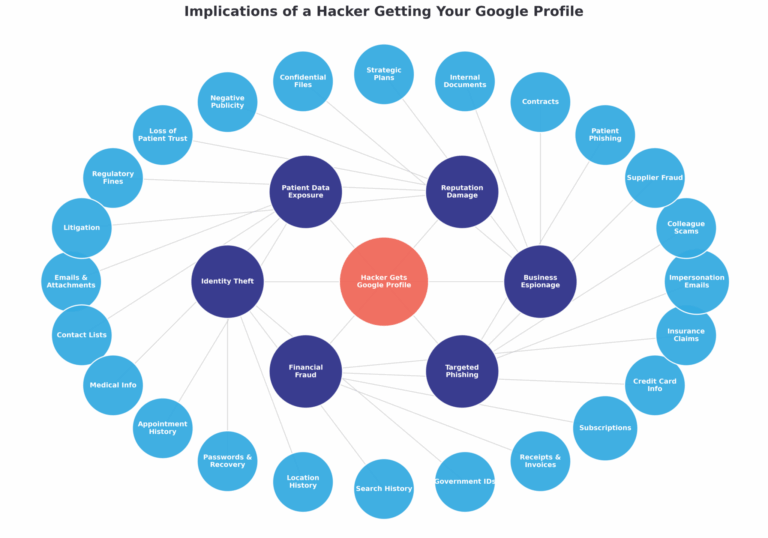
Figure 1: Visualization of the ripple effects when a hacker gains access to a Google profile
What is inside a Google Takeout archive
Most people do not realize what Google stores. The Takeout tool was designed for convenience, a way to back up data or move it to another service. For criminals, it is a goldmine.
A Google Takeout archive may include:
- Emails and attachments: your entire Gmail inbox and sent folder.
- Contacts: names, phone numbers, addresses, and personal notes.
- Calendars: every appointment, patient booking, and meeting invite.
- Files: everything saved in Google Drive, including shared documents.
- Photos and videos: often with metadata such as dates and locations.
- Location history: a log of where you have been, often to the minute.
- Purchases and receipts: online shopping, travel, and payment details.
- Search and browsing history: what you have looked for, and when.
Why hackers love this file
Before the rise of AI, a Takeout archive might have been overwhelming. Thousands of pages of data are time consuming to sift through manually.
Today, an attacker can feed the archive into an AI system and have it analyzed in minutes. An AI tool can:
- Search for passwords, reset links, and security codes.
- Build a map of your contacts and relationships.
- Summarize contracts or sensitive business plans.
- Highlight financial records or insurance claims.
- Flag anything that could be reputation-damaging.
AI transforms what was once ‘too much data’ into a neatly organized dossier.
The healthcare connection
In dentistry and healthcare, protecting personal information is not optional. In Canada, legislation such as PHIPA and PIPEDA requires clinics to safeguard patient data. A compromised Gmail account could easily cross the line into noncompliance.
Imagine an attacker downloading your Google profile and finding:
- Patient appointment confirmations in your calendar.
- Insurance details inside email attachments.
- Referral notes or treatment discussions shared with colleagues.
- Contact details for every patient you have ever emailed.
Hackers do not need to break into your practice management software if they can already see this level of detail in your Google profile. The reputational and regulatory fallout would be serious.
3 simple habits to protect yourself and your patients
1. Do not log into Google on shared or public devices
Hotel business centers, libraries, or a borrowed computer all carry risks. Shared devices can store your login credentials, run keyloggers, or leave behind cookies that allow attackers to slip back in later.
Stick to your own devices whenever possible. If you must log in somewhere else, use Private or Incognito mode and log out completely when finished.
2. Turn on Multi-Factor Authentication (MFA)
Passwords alone are no longer enough. If your credentials are stolen, MFA is often the only barrier left.
Use an authenticator app such as Google Authenticator, Authy, or Microsoft Authenticator. For stronger protection, consider a hardware security key. Avoid relying on text message codes, which can be intercepted.
3. Lock down your Google data
If you have ever downloaded your Takeout archive for backup or migration, treat it as highly sensitive.
Delete old copies you no longer need. If you must keep one, encrypt it using FileVault on a Mac, BitLocker on Windows, or a password-protected ZIP file. Never leave it sitting unprotected on your laptop or in cloud storage.
A note for dentists using Gmail
If you use a Gmail account for patient communication, Google automatically stores all of those emails, attachments, and contact details in your profile.
If your account is hacked, the attacker does not just get your information. They get everything about your patients too.
Cybersecurity is not just about you. It is about everyone who trusts you.
Protecting your inbox is protecting your practice.
Moving forward
Cybersecurity Awareness Month is about turning small actions into lasting protection. For dental professionals, few actions are more important than securing your Google profile.
A single compromised account could hand hackers the keys to your patients’ trust and your practice’s reputation. By adopting three habits, avoiding risky logins, enabling MFA, and locking down your Google data, you can significantly reduce the risk.
This is not a distant or abstract problem. With more than 1.8 billion Gmail accounts worldwide, attackers know the odds are in their favor. Every dental professional who relies on Gmail has a responsibility to take these steps.
Moving forward, the goal is not perfection. It is progress. Every additional layer of security makes it harder for criminals and safer for your patients. That is how we build trust in the digital world.
TL; DR (Too Long; Didn’t Read)
- If hackers get into your Google account, they can download your entire profile using Google Takeout.
- This file contains emails, contacts, calendars, files, photos, location history, and more.
- AI makes it easy for criminals to analyze this data quickly.
Three habits that help:
- Do not log into Google on shared or public devices.
- Use multi-factor authentication.
- Delete or encrypt Google Takeout archives.
– For dentists, this is also a compliance issue under PHIPA and PIPEDA.
Glossary of key terms
1. Google Takeout
A tool from Google that lets you download all the information linked to your Google account (emails, contacts, calendars, photos, files, search history, etc.). Hackers love it because it gives them everything in one neat package.
2. Compromised Account
This means a hacker has broken into your account and can act as if they were you—reading emails, sending fake messages, or digging through files.
3. Phishing
A cyber scam where attackers send fake but convincing emails or texts to trick people into clicking harmful links or giving away personal information, like passwords.
4. Metadata
Hidden information stored inside files, photos, or documents, for example the date a photo was taken, the location where it was captured, or who created the file. Hackers can use this to piece together private details.
5. Multi-Factor Authentication (MFA)
A security step that requires more than just a password to log in. For example, entering a code from your phone or using a physical security key. It’s like having a second lock on the door.
6. Compliance (PHIPA / PIPEDA)
Legal rules in Canada that require dentists and healthcare providers to keep patient data private and secure. If patient data is exposed through a hacked account, it can mean fines, investigations, and reputational damage.
About the author

Anne Genge is Canada’s leading educator on AI privacy, and cybersecurity for dentistry. With 25 years of experience helping healthcare practices stay secure, she now serves as a fractional AI Officer, guiding dental teams through the risks and opportunities of emerging technologies. A graduate of Queen’s University Law School’s AI & Law program and Harvard Medical School’s Healthcare AI Strategies and Implementation Program, Anne helps practices adopt AI tools that are both innovative and compliant. In a world of fast-moving startups and untested applications, she ensures dentists can embrace AI with confidence, protecting patient trust while growing their practices. Anne can be reached by email at anne@myla.training