
As a keen reader of Oral Health, you are likely well-versed in the importance of dental hygiene. While both dental hygiene and data hygiene require proactive, ongoing attention to prevent serious consequences, data hygiene in cybersecurity focuses not on preventing gum disease but on the practices and processes used to ensure that data remains clean, accurate, secure, and free from vulnerabilities that could be exploited by cyber threats.1
A recent example of such a cyber threat targeting the dental industry was the 2023 Henry Schein BlackCat ransomware attack. This incident forced the company to suspend operations for nearly a month. It led to customers sourcing supplies from other providers, even after the company offered discounts to retain their business.2 A data breach can severely and possibly irreversibly damage consumer trust in the affected entities.
As noted by CFPB Director Rohit Chopra in 2023, referring to the Consumer Financial Protection Bureau, a U.S. government agency responsible for overseeing financial markets and consumer protection-sensitive information, ranging from the financial details of military personnel to data on individuals with dementia, is becoming an increasingly sought-after commodity, mainly as it powers automated decision-making systems, such as large language models.3
Thus, given the rising value of sensitive patient information, the risk of a dental clinic experiencing a cyber-attack – and thus losing operational efficiency and patient trust – is significant.
Take a moment to consider all of the technology in a dental clinic: the desktop computers in the waiting room used by receptionists to book appointments and handle billing information, the monitors displaying schedules in the operating rooms, the charts the hygienist uses to access patient information, and the cell phone the practice manager uses to communicate details about operations. In the digital age, a dental practice handles significant data that can be a prime target for adversaries. How will you ensure it remains secure?
Tip #1. Data cleaning and validation
Spring cleaning should be reserved for more than suburban garages or office fridges. The less data stored in the clinic, the less you have to secure. Make it a habit to remove outdated, redundant, or incorrect data to prevent it from cluttering systems and creating security risks.
After moving files to the trash, permanently erase them with a secure deletion tool. These tools overwrite deleted files with random data, making them nearly impossible to recover. Programs such as SDelete for Windows, Secure Empty Trash for macOS, or another reliable third-party tool to securely erase sensitive files. For databases, run specific queries to identify and delete outdated, redundant, or incorrect data.
The next step is to implement data validation practices. This ensures that data entered into the system is valid and conforms to expected formats, helping to prevent injection attacks and other vulnerabilities. For example, SQL injection attacks occur when attackers exploit poor data validation to inject malicious SQL code into input fields that interact with a database. An attacker could, for example, input SQL commands into a login form, which, if not validated, could allow them to bypass authentication and access the clinic’s sensitive data.
Cross-site scripting (XSS) is another type of attack in which attackers inject malicious scripts into web pages that are then executed in the browsers of other users. For example, an attacker might inject a script into a comment review field on your website. If the comment is displayed without proper validation, the script could run in other users’ browsers, leading to data theft or malicious activity.
A great first step toward maintaining data hygiene is consistently removing old data that the clinic no longer needs and ensuring that the data acquired is validated, such as by offering preset options on appointment forms rather than accepting free-text input on the website.
Tip #2. Role-Based Access Controls (RBAC)
Not every team member of a dental clinic is present in the patient consultation room for a reason – the work healthcare professionals do is confidential. Access controls in a dental clinic protect sensitive patient information and ensure that only authorized personnel can access specific data. These controls are also essential for complying with legal requirements such as PIPEDA in Canada, HIPAA in the United States, or GDPR in the E.U.4
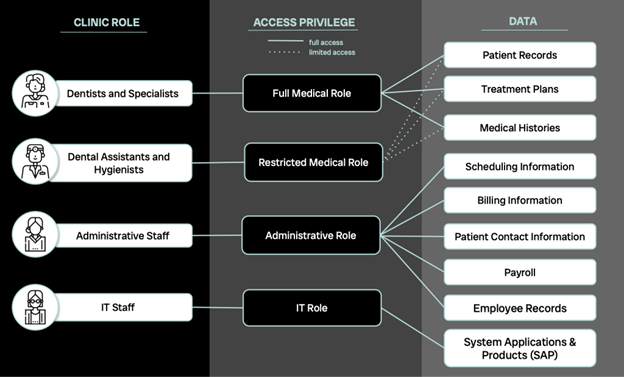
Role-based access Control (RBAC) restricts access to data and resources based on the roles of individuals within the clinic. Each role is assigned specific permissions that align with job responsibilities. See Figure 1 for a sample role-based access control implementation that can serve as a general guideline and be adapted to your clinic’s needs.
Fig. 1
Tip #3. Regular access reviews
Similar to how you emphasize the importance of dental checkups to patients, ensure periodic reviews of access permissions for all staff members to confirm they align with their current roles. Adhere to the principle of least privilege, meaning each employee should only have access to the data necessary for their specific duties.
Case in point: If a dental assistant is temporarily covering billing tasks while the office manager is on leave, grant them access to financial records solely for the duration of their temporary role. Set a clear deadline for when this access will end or schedule a review to ensure it’s still appropriate.
Similarly, when a staff member leaves the clinic or changes roles, promptly revoke their access. Just like retrieving office keys from a departing employee, ensure that data access privileges are adjusted or removed as needed. This ensures the prevention of any unnecessary risk of data breaches and that sensitive information doesn’t leave the clinic or fall into the wrong hands.
Tip #4. User authentication
“P@ssword123,” “iloveflossing,” or the year the clinic started – these are examples of weak passwords. As the newly minted cybersecurity expert at your clinic, it is your responsibility to ensure that passwords are stronger and more secure than these. Implement and enforce robust password policies that require complex passwords and regular updates. Each user should have a unique password, and passwords should never be shared. Avoid using centralized admin or guest logins; individual credentials are essential for tracking data access and identifying potential breaches.
Encourage staff to create passwords of at least 16 characters, avoiding easily guessable information such as names, family members, pets, or local streets. Passwords should include a mix of uppercase and lowercase letters, numbers, and special characters (think exclamation marks, asterisks, etc.). Although remembering complex passwords can be challenging, avoid writing them down on sticky notes around the office. Instead, suggest using a memorable quote or song lyric, with added capital letters and numbers.
Passwords should ideally be changed every ninety days, and multi-factor authentication (MFA) should be implemented wherever possible.5 However, be wary of phishing attempts that may fake MFA emails or alerts – educating your staff about these threats is crucial (more on employee education and awareness to come in Tip #14).
Tip #5. Data encryption
This one is non-negotiable. Data encryption isn’t just a recommended practice for handling sensitive patient information, it’s mandated by legal regulations.6 For dental clinicians, implementing data encryption is crucial for protecting patient information and ensuring compliance with regulations such as PIPEDA or HIPAA. Start by assessing needs and understanding the encryption requirements outlined by these regulations. Encrypt data at rest (documents, databases, back-ups) using file-level encryption tools like BitLocker for Windows or FileVault2 for macOS and ensure that your dental practice management software or cloud storage services offer encryption options.7 For data in transit, use encrypted email services and ensure that web-based patient portals are protected with HTTPS. Implement a Virtual Private Network (VPN) for secure remote access. Manage encryption keys by storing them securely and rotating them regularly according to best practices. Regularly audit encryption practices and keep systems updated with the latest security patches. If you’re unsure where to start, reach out to your I.T. team for assistance in setting this up.
Tip #6. Data backup and recovery
For any data that can’t be purged, as recommended in Tip #1, ensure that it is backed up and stored securely. A typical ransomware attack involves encrypting a victim’s data, rendering it inaccessible, and then demanding payment for the decryption key. While having data backups will not help with a data leak, these extra copies can help mitigate operational setbacks. Implementing a robust backup strategy and a disaster recovery plan will enable you to quickly recover your data and systems in case of a breach or other disaster.
Tip #7. Set up automated logging and monitoring
In a dental office, database activity monitoring encompasses one key category regarding the most sensitive information: electronic health information data. This includes all data collected from patients, such as information provided on forms, notes taken during appointments, and diagnostic images like X-rays. By setting up automated monitoring, you can capture and correlate detailed activities related to electronic health information. This includes tracking who accesses the data, logs into accounts, executes queries, views records, and shares or copies information.
Unlike large corporations with sprawling global networks, dental clinics often have the advantage of more straightforward, more manageable data logging systems. To enhance data protection, ensure the clinic’s electronic health record system or practice management software has comprehensive logging features enabled. These logs should capture detailed information on all access to patient records, including the user’s identity, time of access, and specific actions performed. Refer to Figure 2 for details on the specific logs to monitor.
Fig. 2
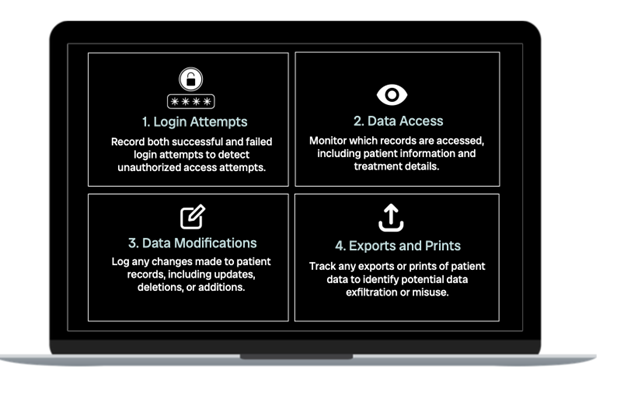
Implementing these logging practices is crucial for monitoring and protecting against unauthorized access, ensuring compliance with regulations, and maintaining the hygiene of the patient data.
Tip #8. Regularly review access logs
Collecting logs is only the first step. Set a regular schedule to review access logs – this could be weekly, bi-weekly, or monthly, depending on the clinic’s data volume and activity. Alongside scheduled reviews, perform random spot checks to uncover any unauthorized access that might not be evident in routine checks. When analyzing logs, watch for access outside normal hours, such as logins outside regular working times or from unusual locations. Also, monitor for repeated access to certain records by staff who should not need frequent access, and keep an eye out for multiple failed logins, indicative of unauthorized access attempts.
If unsure about how to set up or review logs, consult with an I.T. professional or cybersecurity expert. However, if you opt to outsource log reviews to your I.T. team, regularly request updates from them or your service provider to stay informed on the status of your security and any notable findings. Think of it this way: You’d want to know if there was a broken window in the office, even if you will not be the one responsible for repairing it.
Tip #9. Use audit and reporting tools
Most modern electronic health record or practice management systems come equipped with built-in monitoring and logging features. Many systems also offer built-in audit reports that summarize access activities. Use these tools to generate reports that highlight any unusual patterns. You can also leverage data analytics tools to filter and analyze logs, helping to spot trends or irregularities that might indicate unauthorized access.
While making the most of existing infrastructure can help offset the costs of hiring additional I.T. support, cybersecurity is not an area where you should cut corners. Consider the financial impact: According to a 2017 study by IBM Security, data breaches cost Canadian companies an average of $190 and U.S. companies an average of $225 per compromised record.8 With thousands of records, these costs can skyrocket quickly. After all, healthcare data breaches are among the costliest, with the average breach across industries costing $4.45 million, but the average healthcare breach soaring to $10.93 million – the highest of any industry.9
Tip #10. Physical access controls
Implementing a clean desk policy (remember Tip #3 about password sticky notes) is crucial in preventing sensitive information from being left out in the open and reinforcing physical access controls. Cybersecurity doesn’t stop at the digital realm; it extends to the physical world as well. Just like digital safeguards, the computers, tablets, and phones in the clinic – each holding sensitive data –must be secured with the same level of diligence. Ensure these devices are kept in secure areas and are locked or logged off when not in use. Additionally, restrict physical access to server rooms and other sensitive data storage areas to authorized I.T. personnel only (and if you recognize this as a form of role-based access control from Tip #4, bonus points to you!).
Tip #11. Employee training and awareness
Social engineering is a manipulation technique used by attackers to deceive individuals into revealing confidential information or performing actions that compromise security. Unlike traditional hacking, which often relies on technical methods, social engineering exploits human psychology and trust. It can be particularly emotional and scary, as it preys on people’s natural instincts and fears. The first step in mitigating social engineering risks is to inform employees about these threats so they can better detect them. Have employees read this article and others about such attacks to start building their awareness and resilience.
Case in point: Imagine an attacker calls your dental clinic pretending to be a new employee from a well-known software company. They claim they need urgent access to your system for a crucial update. By using authoritative language and creating a sense of urgency, they persuade an overwhelmed practice manager to provide login credentials or remote access. This social engineering tactic exploits the victim’s trust and sense of immediacy, leading to unauthorized access. To mitigate, have employees verify the identity of anyone requesting sensitive information or access, and ensure such requests go through proper verification channels.
More familiar to most people are phishing attacks, which come in the form of emails or texts pretending to be from legitimate sources such as Microsoft, Google, or even a referring dentist. These attacks aim to steal information, credentials, or contact details.
Raising awareness about phishing is valuable, but actively engaging employees is even more effective. Invest in phishing training modules or allocate part of your budget towards phishing simulations from reputable providers. These exercises replicate real attack scenarios, helping employees recognize and respond to potential threats.
Not sure if this is necessary? Have a look at Figure 3, which shows a sample phishing email. Imagine dealing with such an email at 3 PM on a busy Monday when the phones are ringing, and most of the office is short-staffed. Would you or one of your employees be tempted to click without thinking?
Fig. 3
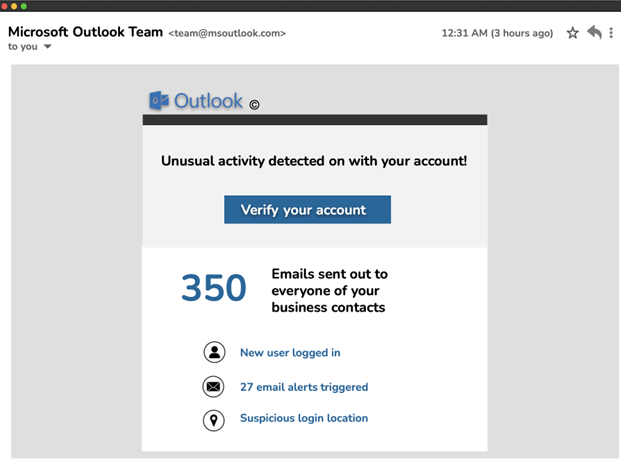
Be especially cautious of phishing attempts related to current events at the time. For example, popular phishing schemes for summer 2024 targeted the Paris Olympics and Taylor Swift’s Eras Tour.10 If you suspect an email might be a phishing attempt, avoid clicking any links. Instead, hover over the sender’s email address and look for signs of deceit, such as misspellings or unusual details. Encourage your team to use the ‘Report Phishing’ button provided by your email service. If your email system doesn’t have this feature, discuss adding it with your I.T. team for quick triage of suspicious messages.
Tip #12. Clear reporting channels
How do you encourage someone to admit they have made a mistake?
When an individual falls victim to a social engineering or phishing attack, they often undergo a range of emotions from embarrassment to guilt, followed by fear of the potential consequences. The reality is that the risks posed by such attacks are too significant for you, the clinic’s cybersecurity custodian, to remain unaware of the breach.
It is imperative to foster an environment where employees feel secure in reporting suspected unauthorized access or other security concerns and understand that they will not face punitive actions for being deceived by a scam. While it is true that they should have exercised greater caution, reprimanding them for failing to report the incident will only hinder transparency. Once an employee realizes that they have compromised the organization’s data, it is critical that they notify you immediately. Time is of the essence, and the longer an attacker remains undetected, the greater the potential for damage.
You may consider implementing an “anonymous tip line” as a tool to encourage employees to report security concerns without fear of exposure. This could involve using a confidential email account monitored by designated personnel or employing an external service provider specializing in anonymous reporting. It is essential that this system is user-friendly and that employees are fully aware of its existence and purpose.
At a minimum, an explicit written policy should be established that communicates to employees that they will not face repercussions for reporting a cybersecurity incident. This policy should be widely disseminated and reinforced through regular training sessions, ensuring employees understand the importance of promptly reporting incidents.
Additionally, a documented procedure, such as a standardized form, must be created to capture all relevant details of any security incident. This form should include fields for the time and date of the incident, the nature of the phishing attempt, the information that was potentially disclosed, and any other pertinent details. A structured approach to incident reporting will ensure no critical information is overlooked and facilitate a more efficient response to the threat.
Tip #13. Vetting third-party access
Now that your employees are well-versed in data hygiene practices, it’s time to turn your attention to third parties involved in your dental clinic’s operations. Pursuing NIST compliance – though not always legally required – offers significant benefits. Adhering to NIST standards, such as NIST 800-53, NIST 800-161, and the NIST Cybersecurity Framework (CSF), can enhance your clinic’s security, improve risk management, assure vendors, build trust, and foster continuous improvement in cybersecurity practices.11
To mitigate risk, thoroughly research potential vendors. Look for evidence of past data breaches and inquire about their own data protection measures.
Case in point: Suppose your clinic uses a third-party company for electronic health records management. During your vetting process, you discover that this vendor had a significant data breach in the past. You should then scrutinize their security practices, ask about recent system updates, and evaluate their incident response plan. This due diligence helps protect your clinic from potential vulnerabilities introduced by the third-party’s systems.
Tip #14. Responsible use of artificial intelligence (AI)
AI tools, including large language models (LLMs) such as ChatGPT, can significantly boost efficiency in dental practices. These advanced systems can assist with creating email templates, drafting clinic reports, and even aiding in diagnostic processes, providing the equivalent of a highly advanced search engine or a robotic assistant. However, the powerful capabilities of AI come with the responsibility of ensuring that patient data remains secure, and never solely relying on the accuracy of AI; instead, use it as a supplementary resource, verifying outputs with peer-reviewed sources and established entities.
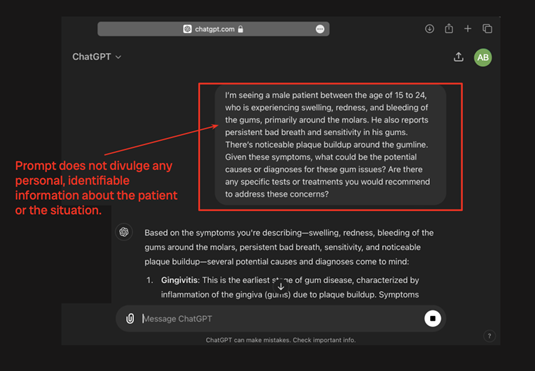
To prevent potential data breaches, it’s essential to approach the use of AI tools with caution. Always anonymize any data before inputting it into AI systems. This means avoiding the use of real names, phone numbers, and specific dates of birth. Instead, use generalized data, such as age ranges rather than exact birth dates, and provide only the minimum necessary information. This practice reduces the risk of inadvertently exposing or misusing sensitive patient information.
Additionally, consider implementing role-based restrictions for AI tool access within your practice. For instance, you might restrict access to AI tools for specific roles, such as receptionists, who handle less sensitive data. If AI tools are integrated into your practice, ensure that they are used from unique, secure accounts to facilitate monitoring and accountability. Establish clear policies regarding the retention of search history and communicate these policies to your team. It’s also crucial to educate your staff on the importance of data anonymization and responsible AI use to ensure that all members of the practice adhere to best practices for protecting patient information. Figure 4 illustrates the real-world application of these practices through a simulated session with the AI language model, ChatGPT.
Fig. 4A
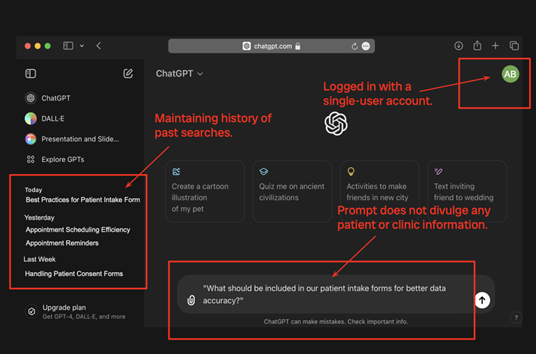
Fig. 4B
And, as always, ensure that any changes to legal regulations, such as PIPEDA or HIPAA, take precedence. AI systems introduce novel privacy challenges that may not yet be fully addressed by existing legislation.12 Remember to stay vigilant and promptly comply with any updates or new regulations as they are implemented.
Tip #15. Stay up to date
As Maya Angelou, the famous American author and poet once said, “Do the best you can until you know better. Then when you know better, do better.” Staying informed about the latest cybersecurity developments, especially those relevant to dental clinics, is essential for knowing better. To keep up to date, follow reputable sources such as the American Dental Association (ADA), the Canadian Dental Association, and the HealthIT.gov website. However, knowledge alone is not enough. It is crucial to apply what you have learned: to educate your staff, to implement effective practices, and to maintain diligent data hygiene. By actively seeking knowledge and taking action, you not only safeguard the data entrusted to you as a dental healthcare professional but also uphold the trust your patients place in you.
Conclusion
In today’s increasingly digital world, the responsibility of safeguarding patient data extends far beyond clinical care; it encompasses the critical need for robust cybersecurity measures. Dental practices are custodians of sensitive information, and any lapse in data hygiene can have severe consequences, from operational disruptions to the erosion of patient trust to legal implications. The 15 tips in this guide offer practical and actionable steps that every dental professional can implement to protect their clinic from cyber threats.
By integrating these cybersecurity practices into your daily operations, you not only work towards compliance with established standards like PIPEDA and HIPAA but also create a safer, more secure environment for your patients and your practice. Remember, cybersecurity is not a one-time effort but an ongoing commitment. Regularly reviewing and updating your protocols, educating your team, and staying informed about the latest developments are crucial to maintaining the integrity and security of your clinic’s data.
As healthcare providers, your role is to care for your patients’ well-being, which now includes protecting their personal information. By prioritizing data hygiene with the same diligence as dental hygiene, you demonstrate your commitment to comprehensive patient care in the digital age. 
Oral Health welcomes this original article.
References
- Government of Canada. (2022, August 2). Cyber Security Hygiene Best Practices for your organization – ITSAP.10.102. Canadian Centre for Cyber Security. https://www.cyber.gc.ca/en/guidance/cyber-security-hygiene-best-practices-your-organization-itsap10102
- Al-Shibeeb, D. (2024, August 7). Henry Schein misses analysts’ estimate of $3.27B in revenue but continues recovery from Cyberattack. Oral Health Group. https://www.oralhealthgroup.com/dentistry/henry-schein-misses-analysts-estimate-of-3-27b-in-revenue-but-continues-recovery-from-cyberattack-1003980535/
- Fung, B. (2023, August 15). US watchdog teases crackdown on data brokers that sell Americans’ personal information | CNN business. CNN. https://www.cnn.com/2023/08/15/tech/privacy-rules-data-brokers/index.html
- University of Saskatchewan. (2024). FAQ’s. School of Rehabilitation Science. https://rehabscience.usask.ca/cers/documents/faqs-for-cers.pdf
- Alder, S. (2023, December 19). How often should passwords be changed in the EHR system?. The HIPPA Journal. https://www.hipaajournal.com/how-often-should-passwords-be-changed-in-the-ehr-system/
- Office of the Privacy Commissioner of Canada. (2021, August 13). Pipeda Fair Information Principle 7 – Safeguards. https://www.priv.gc.ca/en/privacy-topics/privacy-laws-in-canada/the-personal-information-protection-and-electronic-documents-act-pipeda/p_principle/principles/p_safeguards/
- Indiana University. (2023, November 21). Indiana University. Indiana University Knowledge Base. https://kb.iu.edu/d/ayzi
- Ponemon Institute LLC. (2017, June). 2017 cost of Data Breach Study – Global Overview. Ponemon Institute© Research Report. https://documents.ncsl.org/wwwncsl/Task-Forces/Cybersecurity-Privacy/IBM_Ponemon2017CostofDataBreachStudy.pdf
- Greenlee, M. (2023, August 16). Cost of a data breach: Healthcare industry impacts. Security Intelligence. https://securityintelligence.com/articles/cost-of-a-data-breach-2023-healthcare-industry-impacts/
- Cerullo, M. (2024, July 12). Paris olympics ticket scams rise ahead of the Summer Games. here’s what to look out for. CBS News. https://www.cbsnews.com/news/paris-olympics-ticket-scams/
- NIST. (2024, August 15). Cybersecurity framework. https://www.nist.gov/cyberframework
- Office of the Privacy Commissioner of Canada. (2023, May 25). Announcement: OPC to investigate CHATGPT jointly with provincial privacy authorities. OPC to investigate ChatGPT jointly with provincial privacy authorities – Office of the Privacy Commissioner of Canada. https://www.priv.gc.ca/en/opc-news/news-and-announcements/2023/an_230525-2/
About the Author

Charlotte Fritz is a final-year Computer Engineering student at the University of Toronto. She has gained valuable experience as a cybersecurity analyst on the Data Loss Prevention team at one of Canada’s leading financial institutions. As co-president of the University of Toronto’s Cybersecurity Student Association, Charlotte is actively involved in fostering a community of aspiring cybersecurity professionals. Her passion lies in leveraging engineering design to enhance cybersecurity in critical sectors, including healthcare, financial services, and robotics.